


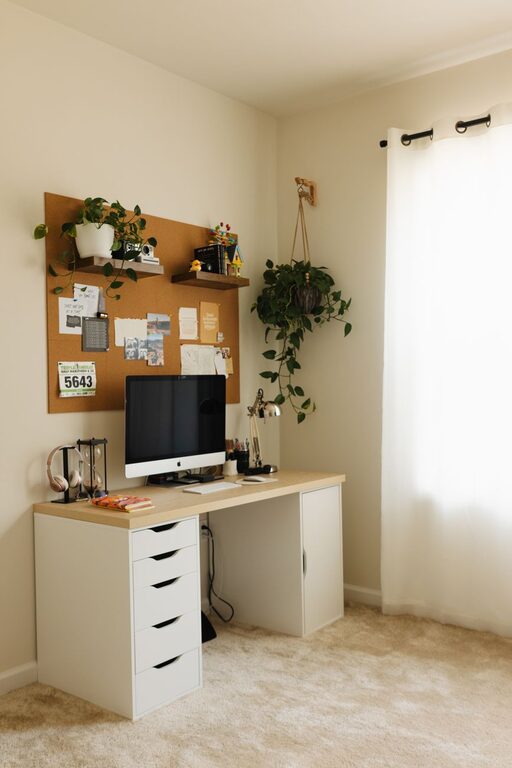
Creating a home office that combines comfort with productivity can significantly enhance your work-from-home experience. Whether you’re setting up from scratch or updating an existing space, the goal is to design an environment that helps you focus, feel comfortable, and stay motivated. Here are some helpful tips to create a cozy and productive home office space.
Choose the Right Location
Selecting the best spot for your home office is crucial. Try to find a location that offers:
– Natural light: Position your desk near a window if possible. Natural light boosts mood and energy.
– Minimal distractions: Avoid high-traffic areas or spaces with lots of noise.
– Enough space: Ensure there’s room for your desk, chair, and other essentials without feeling cramped.
If space is limited, consider using room dividers or screens to define your workspace and create separation.
Invest in Comfortable Furniture
Comfort directly impacts productivity. The right furniture supports your body and helps prevent discomfort over long hours.
– Ergonomic chair: Look for adjustable chairs with good lumbar support.
– Spacious desk: Choose a desk that fits your equipment and allows for comfortable movement.
– Footrest and monitor stands: These accessories improve posture and reduce strain.
Remember to arrange your monitor at eye level and keep your keyboard and mouse close to reduce tension.
Personalize with Cozy Touches
Adding personal and cozy elements can make your workspace inviting and reduce stress.
– Soft textiles: A throw blanket or seat cushion can add warmth.
– Plants: Indoor plants improve air quality and add a calming, natural vibe.
– Artwork or photos: Surround yourself with inspiring or comforting images.
Balance personalization with keeping the space uncluttered to maintain focus.
Organize for Efficiency
A cluttered workspace can hinder concentration. Use smart organization methods to keep things tidy.
– Desk organizers: Use trays or drawers for stationery and supplies.
– Shelving: Install shelves to store books and files within reach.
– Cable management: Use clips or sleeves to keep cords neat.
Regularly declutter and keep only items you use daily on your desk.
Optimize Lighting
Proper lighting reduces eye strain and enhances focus.
– Layered lighting: Combine natural daylight, overhead lighting, and a desk lamp.
– Adjustable desk lamp: Choose one with brightness control and adjustable angle.
– Avoid glare: Position screens to minimize reflections and use window treatments as needed.
If nighttime work is common, consider warm-toned bulbs for a relaxing atmosphere.
Minimize Noise and Distractions
Noise can disrupt your concentration. Here’s how to create a quieter space:
– Use noise-cancelling headphones: Great for blocking out household sounds.
– Add soft furnishings: Rugs, curtains, and cushions absorb sound.
– White noise machines: These can mask background noises effectively.
Inform family or roommates of your working hours to reduce interruptions.
Set Clear Boundaries and Schedule
A designated workspace helps separate work and rest.
– Keep your workspace for work only: Avoid eating or relaxing there.
– Set working hours: Create a routine that signals the start and end of your day.
– Take breaks: Use techniques like the Pomodoro method to stay refreshed.
Clear boundaries support mental balance and boost productivity.
Incorporate Technology Wisely
Make sure your tech setup supports your work without adding stress.
– Reliable internet connection: Essential for video calls and online tasks.
– Wireless accessories: Reduce cable clutter with wireless keyboard and mouse.
– Backup solutions: Use cloud storage or external drives to keep data safe.
Regularly update software and maintain your devices for smooth operation.
Maintain Good Air Quality and Temperature
A comfortable climate improves focus and well-being.
– Ventilation: Open windows or use air purifiers for fresh air.
– Temperature control: Use fans or heaters to maintain a pleasant temperature.
– Humidity: A humidifier can help if the air is dry.
Pay attention to your physical comfort as part of your productive workspace.
Final Thoughts
Designing a cozy and productive home office is about balancing comfort with organization and focus. By choosing the right location, investing in ergonomic furniture, personalizing your space, and managing distractions, you create an environment where work feels less like a chore and more enjoyable. Make small adjustments over time and find what works best for your routine and needs.
With these tips, your home office will be a space you look forward to spending time in, boosting both your comfort and productivity every day.